EntroutWeb

Tag: WordPress

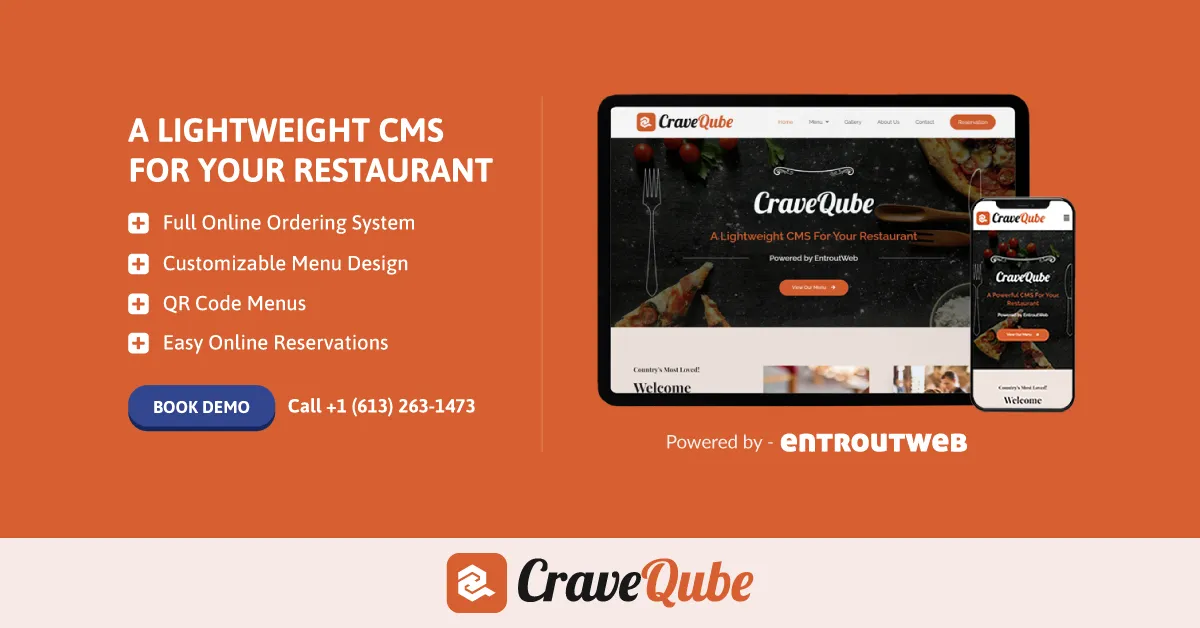
Are you ready to elevate your restaurant’s digital presence? Meet CraveQube, a powerful, lightweight CMS tailored specifically for the restaurant industry, powered by the innovative minds at EntroutWeb.

What is CraveQube?

CraveQube is a fully customizable content management system designed to simplify and enhance the online experience for restaurant owners and their customers. Whether you’re looking to showcase a delectable menu, manage online reservations, or streamline your ordering system, CraveQube has you covered.

Key Features

1. Full Online Ordering System: Take your orders online with ease, eliminating the hassle and allowing your customers to order their favorite dishes from the comfort of their homes.

2. Customizable Menu Design: CraveQube lets you craft a visually appealing menu that reflects your restaurant’s unique style and culinary offerings. You can update your menu anytime, ensuring it always features your latest dishes and specials.

3. POS Integration: Seamlessly integrate CraveQube with your existing Point of Sale (POS) system to keep track of orders and sales, making your operations smoother and more efficient.

4. Online Reservations Management: Say goodbye to manual bookings. With CraveQube, managing reservations has never been easier. Customers can book tables directly from your website, and you can keep track of all bookings in one place.

5. QR Code Menu Option: Offer your customers a contactless dining experience with QR code menus. It’s a safe, modern, and convenient way for guests to browse your offerings without touching physical menus.

Monthly/Maintenance Packages

EntroutWeb offers flexible monthly and maintenance packages to ensure your CraveQube system runs smoothly and is always up-to-date. From regular updates and backups to technical support, these packages provide peace of mind so you can focus on what you do best—delighting your customers.

Convert Your Menu Online

Transform your traditional menu into an interactive online experience. CraveQube makes it simple to digitize your menu, allowing you to reach a broader audience and provide a modern dining experience that today’s customers expect.

Fun and Interesting Features

CraveQube is not just about functionality—it’s about making your restaurant stand out in a crowded digital landscape. With eye-catching designs, user-friendly interfaces, and a range of customizable features, CraveQube ensures your restaurant’s website is not only functional but also fun and engaging.

Why Choose CraveQube?

Choosing CraveQube means partnering with EntroutWeb, a company dedicated to innovation and excellence. Our expertise in web development and commitment to customer satisfaction guarantees that your restaurant will shine online.

Get Started Today!

Ready to take your restaurant to the next level? Visit EntroutWeb to learn more about CraveQube and book a demo today. Let’s make your restaurant’s online presence as delicious as your food!

CraveQube by EntroutWeb is here to transform the way you do business. Embrace the future of dining with a CMS that’s designed to grow with your restaurant. Join the revolution and see the difference for yourself!

Tag: WordPress

Does your WordPress website keep breaking when you try to update your plugins or theme? Is your WP backend too messy to handle? You’re not alone. This is a common issue that many WordPress users face, leading to downtime, lost revenue, and a lot of frustration. Fortunately, there’s a solution that can save you time and hassle.

  • Switch to Trusted Plugins: Our curated selection of third-party plugins is powerful, user-friendly, and easy to manage.
  • Rigorous Testing: Each plugin is tested for compatibility and performance, ensuring seamless integration with your existing setup.
  • Reduced Conflicts: Enjoy smoother updates and a more stable website with our handpicked plugins.
  • Enhanced Functionality: Improve your site’s SEO, add advanced forms, enhance security, and boost performance without the usual headaches.
  • Simple Management: Our WordPress backend solutions are designed to be straightforward and stress-free, with intuitive interfaces and clear documentation.
  • User-Friendly: You don’t need to be a tech expert to use our plugins effectively, thanks to comprehensive guides and customer support.
  • Expert Assistance: Our team is always available to provide advice and assistance.
  • Improved Security: Enhance your website’s overall security with our trusted solutions, protecting your site from vulnerabilities and threats.
  • Custom Solutions: Where we cannot find a trusted plugin, our expert developers can create a custom one especially for you, tailored to meet your specific needs.

Stop letting unreliable plugins hold you back. Make the switch to EntroutWeb’s trusted solutions and enjoy a WordPress experience that’s smoother, more reliable, and easier to manage. With our handpicked plugins and clean backend solutions, you can keep your site running flawlessly and focus on what really matters – growing your business. Experience the difference for yourself and say goodbye to the frustration of broken plugins and themes.

Tag: WordPress

Choosing the right hosting provider is an essential step in ensuring your website’s success, performance, and security. With so many options available, it can be overwhelming to determine the best fit for your needs. Let’s break down how to evaluate and choose, using popular providers like GoDaddy, HostGator, SiteGround, and BlueHost as examples.

Determine Your Hosting Needs

  • Type of Hosting: There are various hosting types such as shared, VPS (Virtual Private Server), dedicated, and cloud hosting. If you’re starting small, shared hosting might suffice. However, larger sites or those expecting significant traffic might consider VPS or dedicated hosting.
  • Traffic Estimate: If you’re expecting high traffic, you’ll need a host that can handle the volume without slowing down your site.
  • Specific Features: Think about any unique features you may need, such as staging environments, Git repositories, or specific software compatibility.

Look Into Uptime Guarantees

A good hosting provider should guarantee at least 99.9% uptime. This ensures that your website remains accessible to users virtually all the time.

Assess Speed and Performance

Speed affects user experience and SEO rankings. Look for hosts that offer solid-state drives (SSDs), multiple data centers, and caching layers.

Evaluate Customer Support

Reliable customer support that’s available 24/7 can be a lifesaver, especially if you’re not technically inclined.

Consider Scalability

As your website grows, you’ll want a host that can grow with you. Check if it’s easy to upgrade your plan in the future.

Review Pricing and Contracts

Some hosts may offer attractive initial discounts but have steep renewal rates. Ensure you’re aware of the long-term costs.

Analyze Top Contenders:

GoDaddy
Pros:
Renowned for domain registration.
User-friendly interface suitable for beginners.
Wide range of products and services.
Cons:
Inconsistent performance reported by some users.
Known to employ aggressive upselling tactics.

HostGator
Pros:
Diverse hosting plans to cater to various needs.
Excellent uptime statistics.
Offers a 45-day money-back guarantee.
Cons:
Higher renewal rates after the initial discount period.
Some users report slower website load times.

SiteGround
Pros:
Exceptional customer support that’s highly rated by users.
High-performance infrastructure, ensuring speedy website load times.
Officially recommended by WordPress.org.
Cons:
Storage limitations on some plans.
Renewal prices are significantly higher post the initial discounted period.

BlueHost
Pros:
Reliable uptime ensures websites are consistently accessible.
Beginner-friendly tools and interface, making it suitable for those new to web hosting.
Another provider officially recommended by WordPress.org.
Cons:
Upselling of add-ons is common during the sign-up process.
Renewal rates can jump significantly after the initial promotional pricing.

By analyzing these pros and cons, you can get a better sense of which hosting provider might be the best fit for your specific needs. Remember, the perfect host for one website might not be the best choice for another, so it’s crucial to assess based on your individual requirements.

WordPress Recommendations

Both SiteGround and BlueHost are officially recommended by WordPress.org, indicating their tailored solutions for WordPress hosting. If WordPress is your CMS of choice, either of these would be a solid pick. SiteGround tends to excel in customer support and performance, though it may come at a premium. BlueHost is more beginner-friendly and often preferred by those new to the platform.

Final Thoughts

The right hosting provider for you will depend on your specific needs, budget, and technical know-how. While SiteGround and BlueHost often stand out for WordPress users, it’s vital to review your individual requirements and perhaps even test a few providers to find the perfect match. Remember, a little research now can save a lot of headaches later.

Tag: WordPress

So, you’ve decided to venture into the realm of websites, but you’re torn between custom-built and pre-existing platforms. We get it. The appeal of saving money and the convenience of using established solutions is tempting. At EntroutWeb, our goal is to enlighten you about the options at hand.

We won’t try to convince you to choose one over the other. Instead, our aim is to provide a transparent look at the pros and cons of each option. By understanding these, you can decide which path is in line with your business objectives.

Let’s break it down:

WordPress:
Known as the powerhouse of the internet, WordPress offers an extensive collection of plugins suitable for various website types. While some are premium, we’ve handpicked free plugins that we deem essential. On the downside, its open-source nature can raise security concerns, exposing sites to potential threats.

When it comes to design, the myriad of themes cater to numerous sectors. However, achieving a truly one-of-a-kind appearance might be a bit challenging.

WIX:
WIX tempts users with its free website creation. Yet, if you want a custom domain, you’ll need to spend. Its drag-and-drop feature is beginner-friendly, but there can be issues with its responsiveness on certain screen sizes. We’re keeping an eye on its move to EditorX which promises better adaptability.

Given the current concerns, we’re hesitant to fully endorse WIX. But for the persistent, coding offers customization potential.

Webflow:
Once you get the hang of Webflow, its efficiency becomes evident. Coupled with the support from the Webflow University community, it’s a potent platform. However, some features like custom domains come with a subscription cost.

It might seem intimidating at first, but when compared to WordPress, it holds its ground once you’re familiar with it.

WooCommerce & Elementor:
As free add-ons, WooCommerce turns websites into online shops, and Elementor facilitates webpage creation. Their synergy with WordPress amplifies their value.

Bear in mind, WooCommerce can have additional costs. Elementor does have a paid version, but with our expertise, even the free variant can be potent.

Shopify:
An eCommerce behemoth, Shopify brims with functionalities. However, it’s faced scrutiny due to some scams. Still, with its vision of establishing a marketplace, it could offer advantages to smaller merchants.

If you’re starting with Shopify, focusing on reputation management is crucial.

Squarespace:
Beginning as a simple website tool, Squarespace now encompasses eCommerce and beyond. Its emphasis on aesthetics is evident with an array of quality stock photos. However, it leans towards the pricier side.

If budget isn’t a constraint, the time invested in learning Squarespace can be rewarding.

With this objective evaluation, we hope to have clarified the capabilities and limitations of these platforms. Stay updated with our subsequent posts as we discuss third-party integration and customer service for each platform. Join our mailing list and continue your exploration into web design, development, and digital marketing with our insights.

Tag: WordPress

Exploring WordPress: A Comprehensive Insight for Your Business Development Needs

Are you in search of an affordable website development solution for your business? Undoubtedly, you’ve come across WordPress, the renowned open-source content management system celebrated for its user-friendly interface and abundant plugin ecosystem. At EntroutWeb, we prioritize transparency, ensuring you’re equipped with valuable insights for your web development voyage.

This isn’t merely a sales pitch. Instead, it’s an in-depth exploration into the world of WordPress, highlighting its strong suits and potential pitfalls. While WordPress is a beacon for many, understanding its constraints is equally essential.

Why WordPress Stands Out:

  • WordPress empowers even those without coding knowledge, allowing them to craft impressive websites.
  • The platform’s intuitive nature, combined with a plethora of themes and plugins, makes website creation seamless for everyone.
  • However, it’s pivotal to recognize certain trade-offs associated with its user-friendly nature.

The Upside of WordPress:

  1. User-Friendly: The drag-and-drop functionality simplifies content creation and editing.
  2. Plugin Galore: Be it SEO enhancements or e-commerce integrations, there’s a plugin for every need.
  3. Budget-Friendly: Free themes and plugins can considerably reduce development costs.
  4. Tailored to You: Customize your website’s look and features without delving into complex coding.
  5. Unwavering Community Support: A vast community ensures you’ll always find solutions to common challenges.

Treading with Caution: The Shortcomings of WordPress:

  • Security Quandaries: Being open-source makes WordPress susceptible to potential breaches.
  • Plugin Predicaments: Heavy reliance on plugins can sometimes lead to compatibility issues.
  • Design Hurdles: Crafting a unique design may sometimes require expert assistance.
  • Performance Bottlenecks: Overloading with plugins or complex themes might slow down your site.
  • Persistent Upkeep: Regular updates are essential but can be demanding.

Choosing WordPress requires an understanding of both its advantages and limitations. While it serves many small to medium enterprises well, larger corporations with specific needs might face challenges.

At EntroutWeb, we emphasize a holistic web development approach. Our seasoned team assesses your unique requirements, offering solutions that align with your goals. If you prioritize security and customization, our bespoke web development might be the way forward.

In this dynamic digital realm, we stand by you. Whether you opt for WordPress or a custom solution, the key lies in making an informed decision aligned with your business objectives. Dive deeper into web development, weigh your options, and set forth on a path to digital success.